Overview - Rear Display And Control Head: Notes
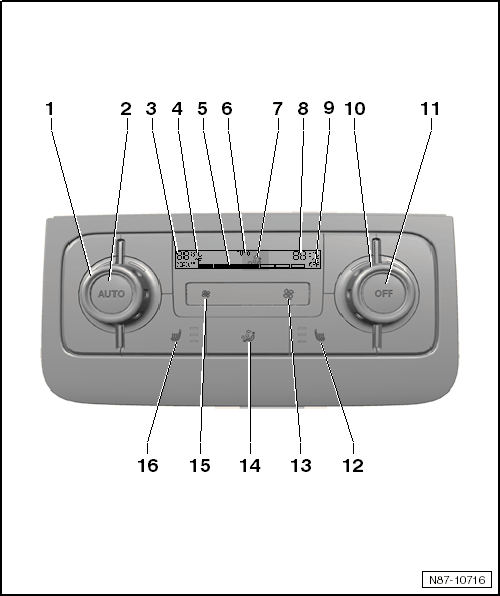 Courtesy of VOLKSWAGEN GROUP OF AMERICA, INC.
- Left Thermostat
- Change left rear temperature setting by turning.
- AUTO
Button
- In automatic mode the Climatronic maintains the selected rear interior temperature automatically. With this setting the vent air temperature, the blower speed and the air distribution are controlled automatically.
- Display for Diagnostic Function
- The display appears when there is communication between the vehicle and Vehicle Diagnostic Tester.
- Selected Interior Temperature Display, Left Side
- Can be changed from degrees Celsius to degrees Fahrenheit and vice versa
- Blower Speed Display
- In automatic operation the actual blower speed is displayed.
- Display of the "Auto" Function
- Air Distribution Display
- Displays the rear air distribution setting.
- Selected Interior Temperature Display, Right Side
- Can be changed from degrees Celsius to degrees Fahrenheit and vice versa
- "OFF" Display
- Illuminates when the heating and A/C function is switched off via the 11
button.
- Right Thermostat
- Change right rear temperature setting by turning.
- "OFF" Button
- Press the "OFF" button to turn off the heater and A/C.
- Right Seat Heater Button
- The seat heater has 3 settings. The LED indicates the current setting.
- If no LED is illuminated, the seat heater is switched off.
- Button for Increasing the Blower Speed
- Air Distribution Button
- Button for Lowering the Blower Speed
- Left Seat Heater Button
- The seat heater has 3 settings. The LED indicates the current setting.
- If no LED is illuminated, the seat heater is switched off.