Start / Stop Switch: Service and Repair
Start System Button (E378)
Special tools, testers and auxiliary items required
• Trim Removal Wedge (VAS 3409)
Vehicles with KESSY have a start system button instead of an ignition switch. The button works as a keyless ignition lock. The start system button is installed in the steering column trim.
• When removing and installing components in a visible area (switches, covers, trims, etc.), use commercially available adhesive tape to mask off the areas at which a prying tool ( (VAS 3409) , screwdriver) will be positioned.
Removal
- Switch off the ignition and all electrical consumers.
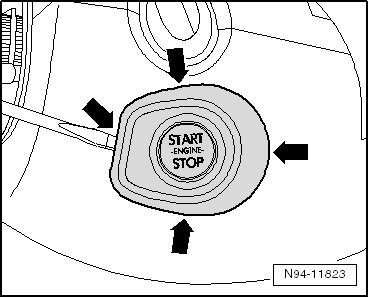
- Carefully pry the cap off of the start system button at the latching mechanisms - arrows - using the (VAS 3409) or a screwdriver.
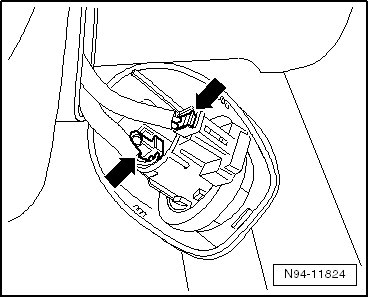
- Release and disconnect the harness connectors - arrows - and remove the start system button.
Installation
Installation is performed in the reverse order of removal. Note the following:
• When installing the cap of the start system button, ensure that it fits securely in the mount on the steering column trim.