September 30: LEMON manuals is back up on a temporary server! Slowness is possible
Complete Disconnect
- In Toolbox 3, click the green circle in the upper right corner to open the connection window.
- Click Disconnect
, and then click the grey circle to close the connection window.
- Disconnect the cable from the connector under the center display.
- Fakra connector:
- Disconnect the ethernet cable and USB cable from the laptop.
- Disconnect the vehicle interface cable from the Fakra connector under the center display.
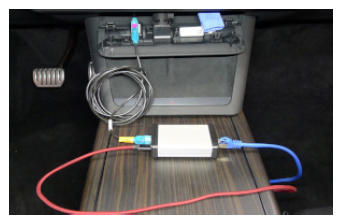 Courtesy of TESLA, INC. Courtesy of TESLA, INC.
|
- Disconnect the vehicle interface cable, the ethernet cable, and the USB cable from the interface box.
- Ethernet connector:
- Disconnect the ethernet cable from the laptop.
- Disconnect the ethernet cable from the ethernet connector under the center display.
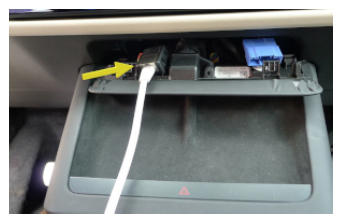 Courtesy of TESLA, INC. Courtesy of TESLA, INC.
|
- Fasten the tabs (x4) that attach the IP service panel to the underside of the center display.
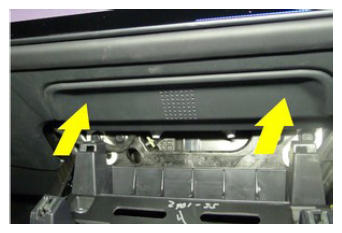 Courtesy of TESLA, INC. Courtesy of TESLA, INC.
|
- Install the phone dock to the center console, and then fasten the clips (x4) that attach the phone dock to the center console.
NOTE:
Pivot the top of the phone dock in to under the instrument panel, and then push the bottom of the phone dock into the center console.
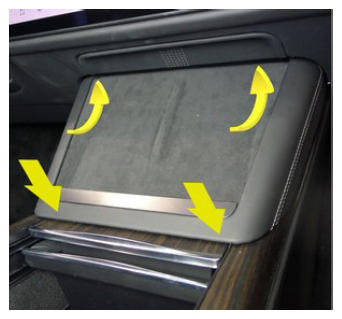 Courtesy of TESLA, INC. Courtesy of TESLA, INC.
|
- Return to the procedure that required the laptop with Toolbox 3 disconnection.