October 30: LEMON manuals on a temporary server, it is slow and having issues, download the manuals you need! Later in November we will switch back to the fast server.
Center Console - Remove and Replace: Install
- With an assistant, install the center console into the vehicle as follows:
- Tilt the front of the center console downwards.
- Slide the center console towards the front of the vehicle.
- Tilt the rear of the center console downwards until it is in place.
- Open the center console rotating lid.
- Connect the electrical connector in the rear of the center console.
CAUTION:
Ensure the connector is properly installed. Perform a push-pull test before continuing this procedure.
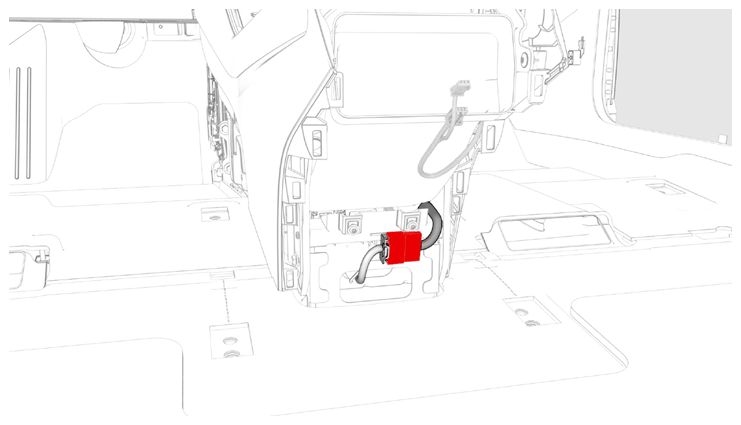 Courtesy of TESLA, INC. Courtesy of TESLA, INC.
|
- Reconnect 12V power. See 12V/LV POWER (DISCONNECT AND CONNECT)
.
- Connect a laptop with Toolbox 3 to the vehicle.
- Using Toolbox, type "VCSEC" in the search tab.
NOTE:
Make sure "Actions" is selected, if not already.
- Using Toolbox, click the play button next to "PING-TP_VCSEC", and then select Run
.
- Update the vehicle firmware. See FIRMWARE UPDATE
.
- Using Toolbox, click the play button next to "PROC_VCSEC_X_PROVISIONING", and then select Run
.
- Using Toolbox, click the play button next to "TEST-SELF_VCSEC_X_ENDPOINT-COMM" and select Run
.
- Place the NFC cards on the center console behind the cup holders.
NOTE:
2 NFC cards are required when pairing: 2 unprogrammed NFC cards, or 1 unprogrammed NFC card and one previously programmed NFC card.
- Using Toolbox, click the play button next to "PROC_VCSEC_C_PAIR-NFC-CARD" and select Run
.
- Using Toolbox, type the number of NFC cards to be paired to the vehicle, and then select Submit
.
- Check the function of the programmed NFC cards.
- Using Toolbox, type "IMMOBILIZER" in the search tab.
- Using Toolbox, click the play button next to "PROC_DI_X-IMMOBILIZER", and then select Run
.
- Using Toolbox, type "ODOMETER" in the search tab.
- Using Toolbox, click the play button next to "PROC-DID_DI_VEHICLE-ODOMETER", and select Run
.
- Using Toolbox, type "RESET_DI" in the search tab.
- Using Toolbox, click the play button next to "TEST-RESET_DI", and then select Run
.
- Disconnect the laptop from the vehicle.
- Install the bolt that attaches the RH rear of the center console to the body.
 7 N.m (5.2 ft-lbs)
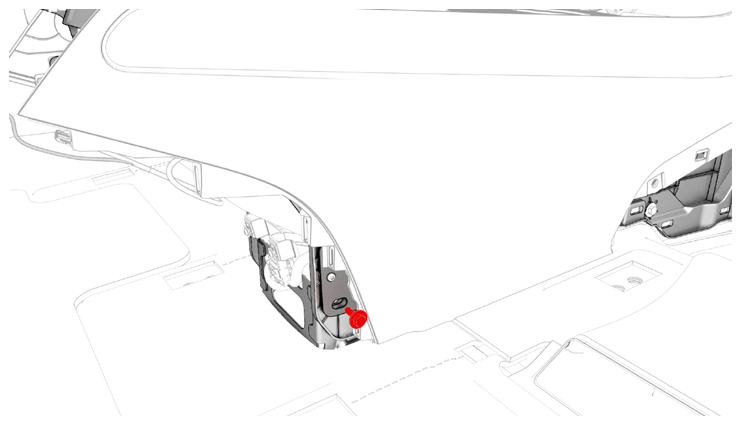 Courtesy of TESLA, INC. Courtesy of TESLA, INC.
|
- Install the bolt that attaches the LH rear of the center console to the body.
7 N.m (5.2 ft-lbs)
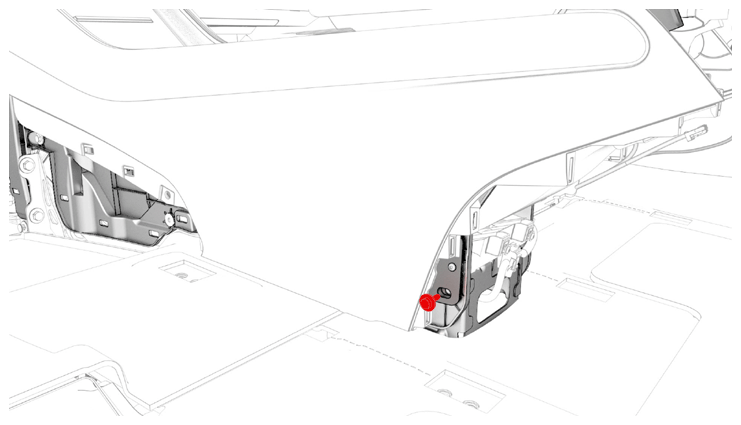 Courtesy of TESLA, INC. Courtesy of TESLA, INC.
|
- Install the center console lower rear panel. See PANEL - LOWER REAR - CENTER CONSOLE (REMOVE AND REPLACE) .
- Install the bolts that attach the front of the center console to the body.
 1.7 N.m (1.3 ft-lbs)
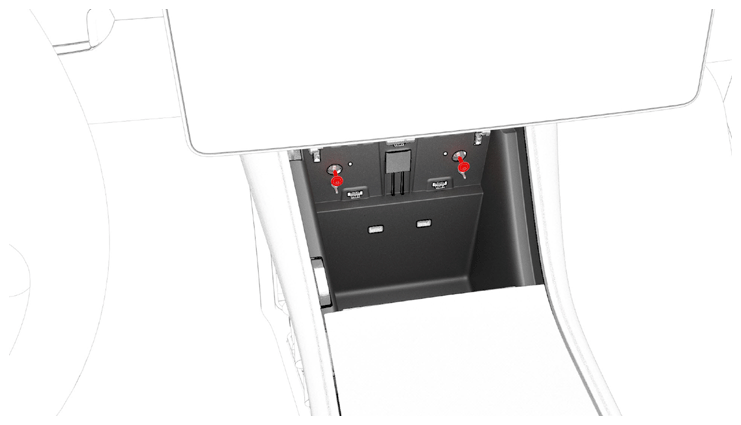 Courtesy of TESLA, INC. Courtesy of TESLA, INC.
|
- Install the phone tray. See PHONE TRAY - CENTER CONSOLE (REMOVE AND REPLACE) .
- Connect the electrical connector that is located at the RH front of the center console.
CAUTION:
Ensure the connector is properly installed. Perform a push-pull test before continuing this procedure.
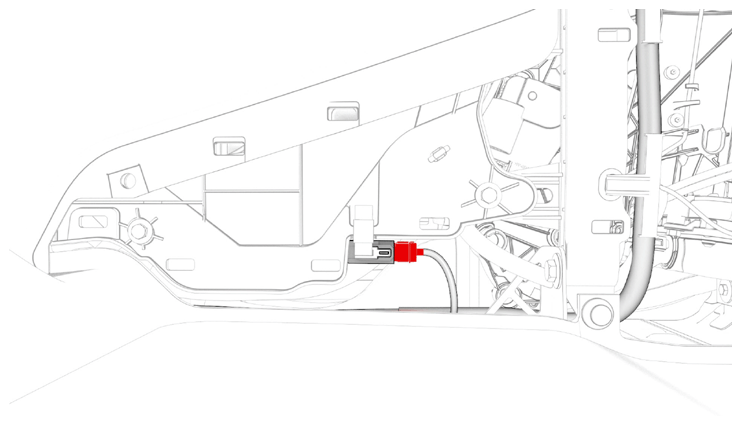 Courtesy of TESLA, INC. Courtesy of TESLA, INC.
|
- Install the bolts that attach the RH front of the center console to the body.
7 N.m (5.2 ft-lbs)
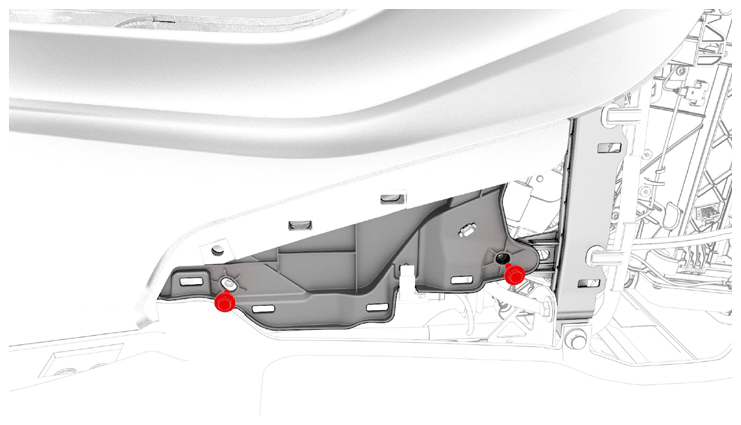 Courtesy of TESLA, INC. Courtesy of TESLA, INC.
|
- Install the RH center console side panel carpet. See SIDE PANEL - CENTER CONSOLE - LH (REMOVE AND REPLACE) .
- Install the front passenger floormat.
- Install the bolts that attach the LH front of the center console to the body.
7 N.m (5.2 ft-lbs)
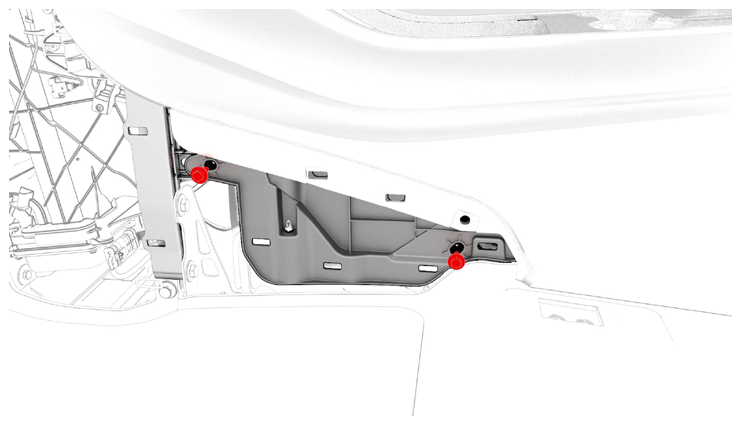 Courtesy of TESLA, INC. Courtesy of TESLA, INC.
|
- Install the LH center console side panel carpet. See SIDE PANEL - CENTER CONSOLE - LH (REMOVE AND REPLACE) .
- Install the driver floormat.
- Install the rear underhood apron. See UNDERHOOD APRON - REAR (REMOVE AND REPLACE)
.
- Install the 2nd row lower seat cushion. See SEAT CUSHION - LOWER - 2ND ROW (REMOVE AND REPLACE)
.
- Restore the customer's belongings into the center console, if needed.