September 30: LEMON manuals is back up on a temporary server! Slowness is possible
Calibration Procedure
- Connect a laptop with Toolbox 2.0 or later to the vehicle.
- With an assistant, use Toolbox to perform the Continental Radar Calibration
procedure:
NOTE:
Bring the adjustment stud Torx E5 socket and driver in the vehicle during the drive cycle.
NOTE:
The following steps require an assistant.
- Put the vehicle in Park.
- Select Panels > Driver Assist > Continental Radar Calibration
.
- Click the Start/Play
button.
- Follow the onscreen instructions.
WARNING:
Perform the calibration procedure in a suitable location and comply with all local traffic safety laws.
NOTE:
If the test drive shows the vehicle to track poorly or pull to the side, or if steering is sloppy or off center, then perform a four wheel alignment check. See FOUR WHEEL ALIGNMENT CHECK
.
- Remove the front fascia assembly Fascia Assembly - Front (Remove And Install)
.
- Remove the HEPA filter inlet duct Duct - HEPA Filter (Remove And Replace)
.
- Clean the front of the radar sensor with water and a clean shop towel.
- If Toolbox determines that the radar sensor needs to be adjusted, adjust the alignment studs (x2) on either side of the radar sensor. Each time a stud is adjusted, use a paint pen to mark the radar bracket near that stud.
CAUTION:
Replace the radar bracket after 5 adjustments of either stud.
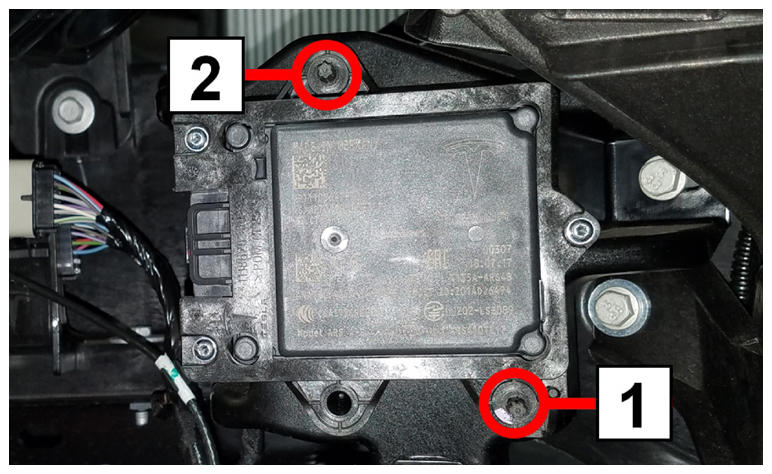 Courtesy of TESLA, INC. Courtesy of TESLA, INC.
|
| 1 |
Horizontal alignment stud |
| 2 |
Vertical alignment stud |
NOTE:
If necessary, use the following images as a guide.
| Clockwise turn |
Counterclockwise turn |
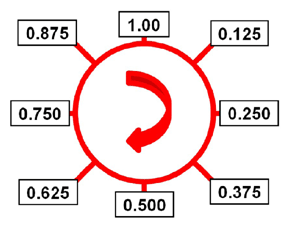 Courtesy of TESLA, INC. Courtesy of TESLA, INC.
|
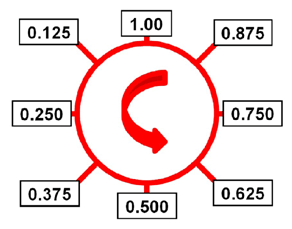 Courtesy of TESLA, INC. Courtesy of TESLA, INC.
|
- Reinstall the front fascia assembly and HEPA filter.
- If the radar sensor was adjusted in the previous step, repeat this procedure from step 2 until Toolbox determines that the radar sensor does not need to be adjusted.
- Perform a road test to check Autopilot and Traffic Aware Cruise Control operation.