October 30: LEMON manuals on a temporary server, it is slow and having issues, download the manuals you need! Later in November we will switch back to the fast server.
Module - Restraint Control (Non-Heat Pump) Remove and Replace: Install
- Install the restraint control module to the body, and then install new nuts (x3) to attach the module to the body.
 8 N.m (5.9 ft-lbs)
NOTE:
Use of the following tool(s) is recommended:
- 10 mm socket
- 2 in extension
- 1/4 in std ratchet
- 1/4 in torque wrench (installation only)
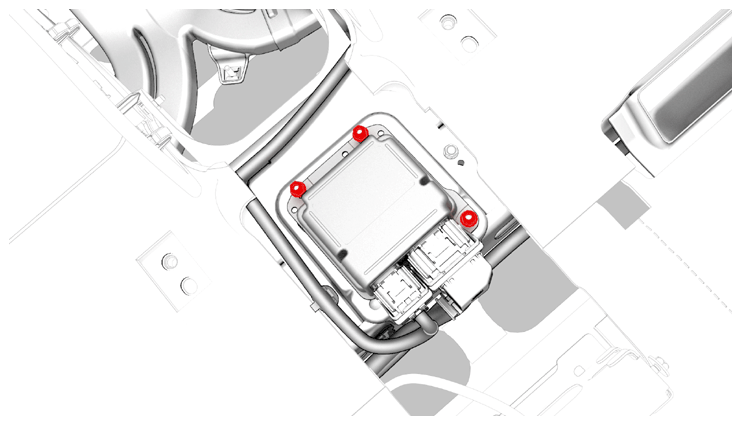 Courtesy of TESLA, INC. Courtesy of TESLA, INC.
|
- Connect the electrical harness to the restraint control module connectors.
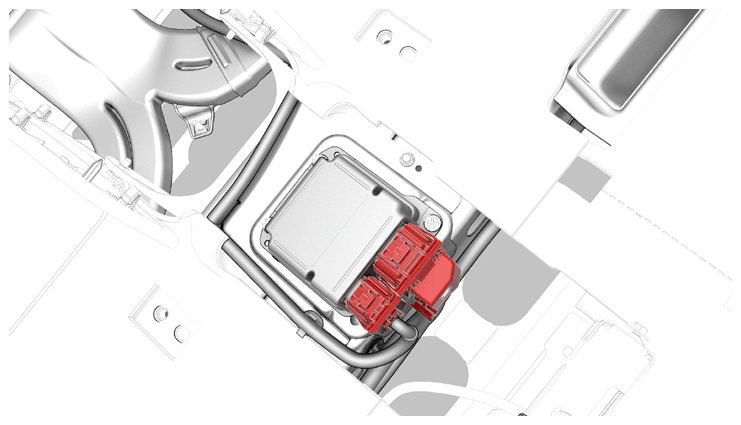 Courtesy of TESLA, INC. Courtesy of TESLA, INC.
|
- Connect 12V power. See 12V/LV POWER (DISCONNECT AND CONNECT)
.
- Install the center console. See CENTER CONSOLE (REMOVE AND INSTALL)
.
- Install the LH and RH center console side panel carpets. See SIDE PANEL - CENTER CONSOLE - LH (REMOVE AND REPLACE)
.
- Install the rear underhood apron. See UNDERHOOD APRON - REAR (REMOVE AND REPLACE)
.
- Park the vehicle on a level surface.
- Connect a laptop with Toolbox 3 to the vehicle.
- Perform the appropriate firmware operation based on the installed firmware version that was determined in step 1 of the removal procedure:
- If the vehicle firmware version is 2022.16.1 or newer, reinstall the vehicle firmware. See SOFTWARE REINSTALL
.
- If the vehicle firmware version is older than 2022.16.1, update the vehicle firmware. See SOFTWARE UPDATE
.
- In Toolbox, click the Dashboards
tab, type "RCM retrofit" in the search field, click PROC_RCM_X_SERVICE-TASKS, click Run
, and allow the routine to complete.
- If alerted to aim the headlights, perform the appropriate headlight aiming procedure:
CAUTION:
Do not return the vehicle to the customer until any alerts to aim the headlights have been addressed.
- Disconnect the laptop from the vehicle.