History DTC
- Turn ON ignition switch.
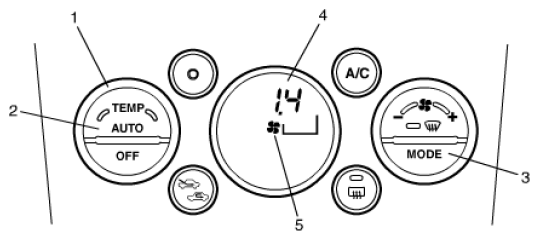
- Set temperature selector (1) to 25 °C (72 °F).
- Push "AUTO" switch (2) and "MODE" selector (3) simultaneously.
NOTE:
Step 2) and 3) must be finished within 15 seconds after completed Step 2).
- Check for DTC (4) referring to DTC TABLE .
NOTE:
- If history DTC is stored in HVAC control module, "FAN" mark (5) and history DTC are displayed on LCD for about 3 minutes continuously.
 Courtesy of SUZUKI OF AMERICA CORP.
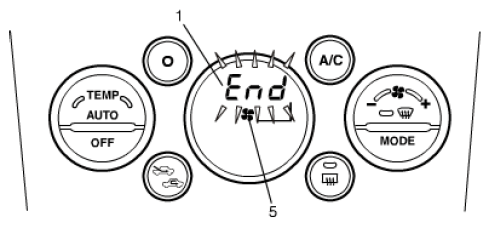
- If no history DTC is stored in its memory, "FAN" mark (5) and "END" (1) are displayed on LCD for about 3 minutes continuously.
- When HVAC control module has stored 2 or more history DTC, each one is displayed once starting from the one of higher priority order.
- History DTC is displayed on LCD by following display step.
- Higher priority DTC displays for 4 seconds.
- No DTC displays for 0.5 second.
- Next priority DTC displays for 4 seconds.
- No DTC displays for 0.5 second.
- As well as above description, all detected DTC is displayed.
- After all detected DTC is displayed, "END" (1) is displayed for 4 seconds.
- DTC display is repeated in same step for about 3 minutes.
 Courtesy of SUZUKI OF AMERICA CORP.
- HVAC control module cancels history DTC display at any of following conditions.
- Ignition switch is turned to "OFF" position.
- Both "AUTO" switch and "MODE" selector are pushed simultaneously.
- After completing above check, turn ignition switch to "OFF" position.