Displaying & Reading Trouble Codes
DTC CheckUsing SUZUKI Scan Tool
1. Prepare SUZUKI scan tool.
2. With ignition switch OFF, connect it to data link connector (DLC) located underside of instrument panel at driver's seat side.
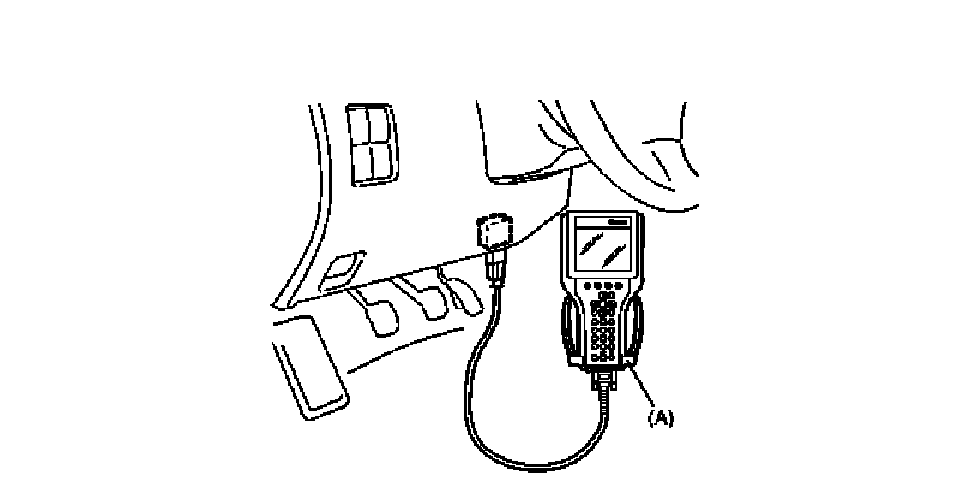
Special Tool
(A) : SUZUKI scan tool
3. Turn ignition switch ON.
4. Read DTC according to instructions displayed on SUZUKI scan tool and print it or write it down.
Refer to SUZUKI scan tool operator's manual for further details.
If communication between SUZUKI scan tool and BCM is not possible, check if SUZUKI scan tool is communicable by connecting it to BCM in another vehicle. If communication is possible in this case, SUZUKI scan tool is in good condition. Then check data link connector and serial data line (circuit) in the vehicle with which communication was not possible.
5. After completing the check, turn ignition switch off and disconnect SUZUKI scan tool from data link connector.
Without Using SUZUKI Scan Tool
1. Check that "Clock/Temp. display" (1) comes ON when ignition switch is turned to ON position.
2. Using service wire (2) , ground diagnosis switch terminal in monitor coupler (3) .
3. With the ignition switch ON position and leaving engine OFF, read DTC from "Clock/Temp. display". Refer to DTC Table.
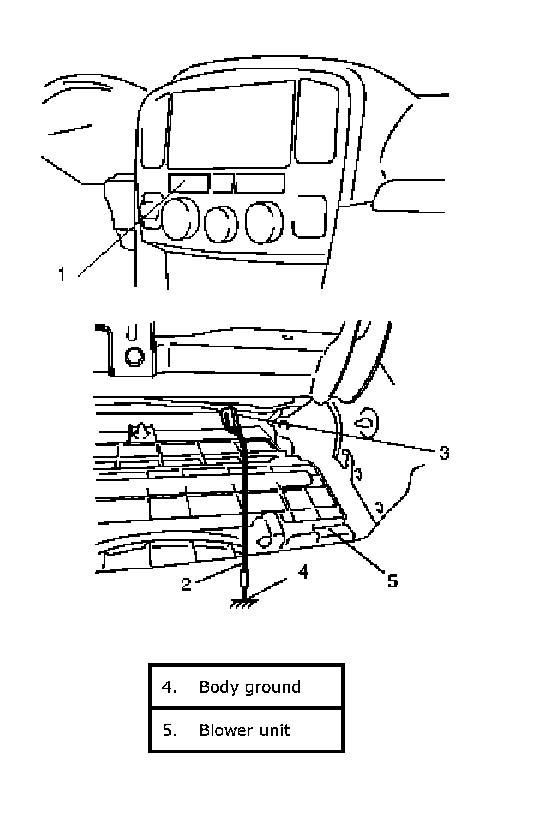
4. After completing the check, turn the ignition switch OFF position and disconnect service wire from monitor coupler.