DTC P0500: Vehicle Speed Sensor (VSS) Malfunction
- If speedometer functions and indicates actual vehicle speed, go to next step. If speedometer does not function properly, check speedometer cable and gears for damage. Repair as necessary and retest system.
- Turn ignition off. Disconnect PCM harness connectors. On models equipped with 3-speed automatic or manual transmission, check for continuity between ground and terminal No. 7 (Yellow wire) at 22-pin PCM harness connector. On models equipped with 4-speed automatic transmission, check for continuity between ground and terminal No. 4 (Yellow wire) at 22-pin PCM harness connector. Raise and support vehicle. Block left rear wheel. Turn right rear wheel slowly. If DVOM display fluctuates between continuity and no continuity, check for poor connection at PCM or VSS. Repair as necessary. If connections are okay, replace PCM and retest system. If DVOM display does not fluctuate, go to next step.
- Disconnect negative battery cable. Access VSS terminals on back of instrument cluster. See Fig 1
. Using DVOM, check for continuity between VSS terminals No. 4 and 10 while rotating speedometer head. If DVOM display fluctuates between continuity and no continuity 4 times for each speedometer revolution, go to next step. If continuity is not as specified, replace speedometer and retest system.
- Check for open in Yellow wire between PCM and VSS, or open in Black/Yellow wire between VSS and ground. Repair as necessary and retest system.
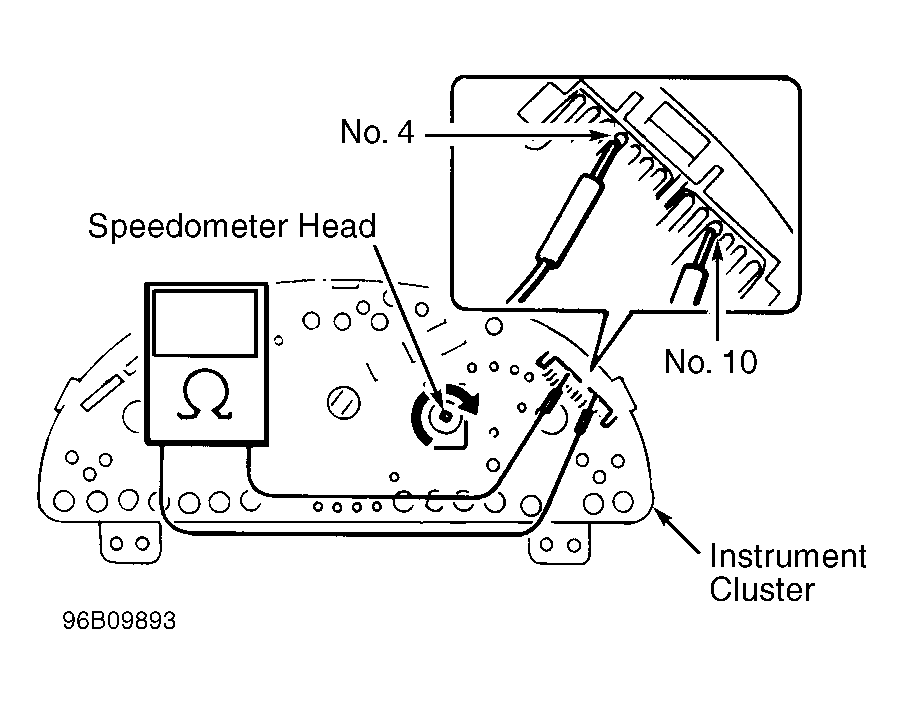 Courtesy of SUZUKI OF AMERICA CORP.