Manifold Absolute Pressure (Map)/Manifold Differential Pressure (MDP) Sensor
- To test MAP sensor on vehicle, turn ignition on. Connect scan tool to Data Link Connector (DLC). Connect a hand-held vacuum pump to MAP sensor. Observe scan tool display as specified vacuum is applied. See MAP SENSOR OUTPUT SIGNAL (ON-VEHICLE)
table.
- If scan tool reading is not within specification, see DTCs P0106, P0107 and P0108 (Esteem and Swift) or DTC P1408 (Sidekick and X-90) in TESTS W/CODES
article. To bench test pressure sensor, see appropriate table below:
If voltage is not within specification, replace MAP sensor.
CAUTION:
Damage to MAP sensor will occur if connections are made incorrectly.
MAP SENSOR OUTPUT SIGNAL (ON-VEHICLE)
| Vacuum (In. Hg) |
Scan Tool Display (kPa) |
| Esteem & Swift |
| 0 |
100 |
| 8 |
73 |
| 20 |
33 |
MAP SENSOR OUTPUT VOLTAGE (OFF-VEHICLE) - ESTEEM & SWIFT
| Altitude (Feet) |
Vacuum (In. Hg) |
Output Voltage |
| 0-2000 |
28-30 |
3.1-3.6 |
| 2001-5000 |
25-28 |
2.8-3.4 |
| 5001-8000 |
22-25 |
2.6-3.1 |
| 8001-10,000 |
20-22 |
2.4-2.9 |
MAP SENSOR OUTPUT VOLTAGE (OFF-VEHICLE) - SIDEKICK & X-90
| Vacuum (In. Hg) |
Output Voltage |
| 8 |
2.4-4.4 |
| 10 |
2.1-4.1 |
| 12 |
1.9-3.9 |
| 14 |
1.6-3.6 |
| 16 |
1.3-3.3 |
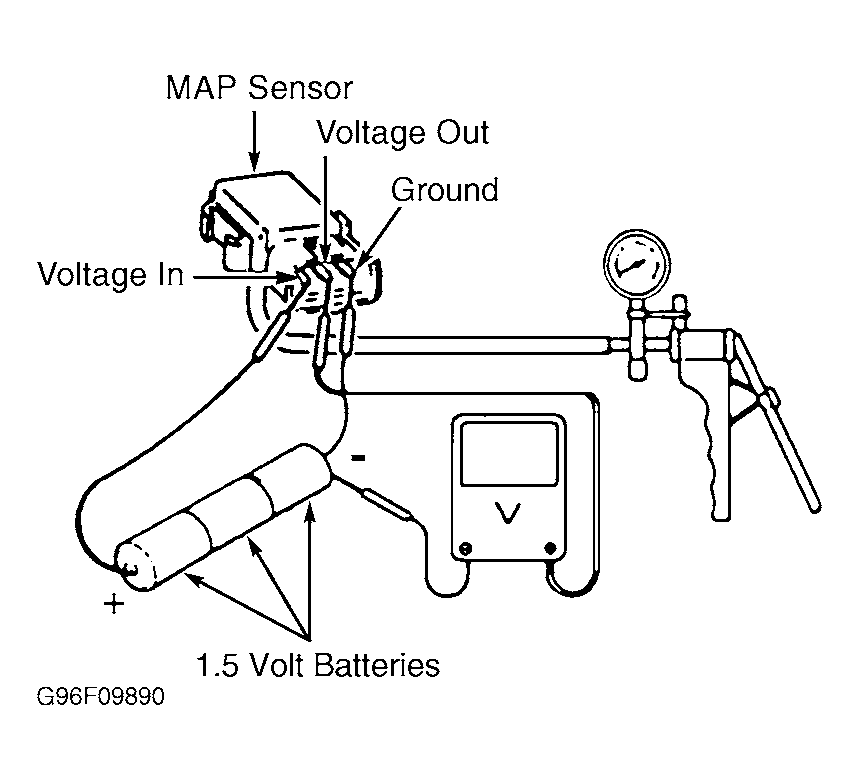 Courtesy of SUZUKI OF AMERICA CORP.