October 30: LEMON manuals on a temporary server, it is slow and having issues, download the manuals you need! Later in November we will switch back to the fast server.
Push Button Ignition Switch: Inspection
- Check the continuity between the connector terminals.
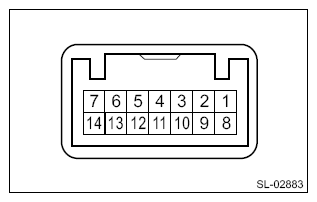 Courtesy of SUBARU OF AMERICA, INC. Courtesy of SUBARU OF AMERICA, INC.
|
| Terminal No. |
Inspection conditions |
Specification |
| 4 (COM) - 5 (GND) |
Always |
Continuity exists |
| 7 (SSW1) - 5 (GND) |
Push button ignition switch released → pressed |
Continuity exists |
| 2 (SSW2) - 5 (GND) |
Push button ignition switch released → pressed |
Continuity exists |
- Check the push button start switch operation when battery voltage is applied between the connector terminals.
CAUTION:
When applying battery voltage, do not mix up the positive (+) side and the negative (-) side.
Incorrect polarity connection may cause LED damage inside the switch.
| Terminal No. |
Inspection conditions |
Specification |
| 11 (SWIL) - 5 (GND) |
Connect battery to the terminals |
Turns off → Switch indicator lights in red |
| 12 (INDS) - 5 (GND) |
Turns off → Switch indicator lights in green |
| 13 (INDW) - 5 (GND) |
Turns off → Switch indicator lights in orange |
- Replace the push button start switch if it is found defective.