October 30: LEMON manuals on a temporary server, it is slow and having issues, download the manuals you need! Later in November we will switch back to the fast server.
Multi Function Display
- Disconnect the ground cable from battery. < Ref. to
BATTERY
, NOTE, Note. >
NOTE:
For models other than STI model, disconnect the ground terminal from battery sensor.
- Remove the center grille assembly. < Ref. to
CENTER GRILLE ASSEMBLY
, REMOVAL, Air Vent Grille. >
- Release the claw and hook, and then remove the cover center UPR.
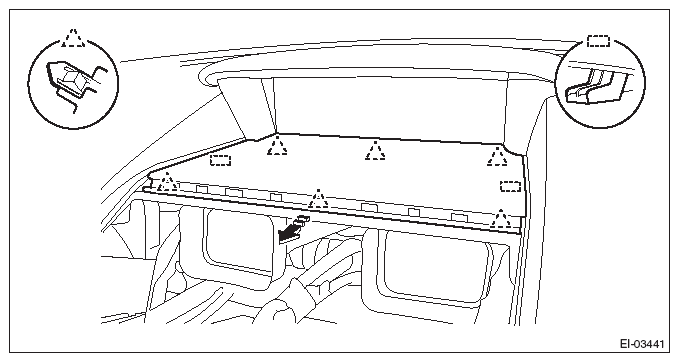 Courtesy of SUBARU OF AMERICA, INC.
NOTE:
Lightly push up the back of the cover center UPR, hook the finger to the end portion and pull it toward you to remove it.
- Remove the multi-function display.
CAUTION:
Be careful not to damage the multi-function display or instrument panel.
- Release the screws and claws.
- Pull the multi-function display assembly toward yourself, and disconnect the connector.
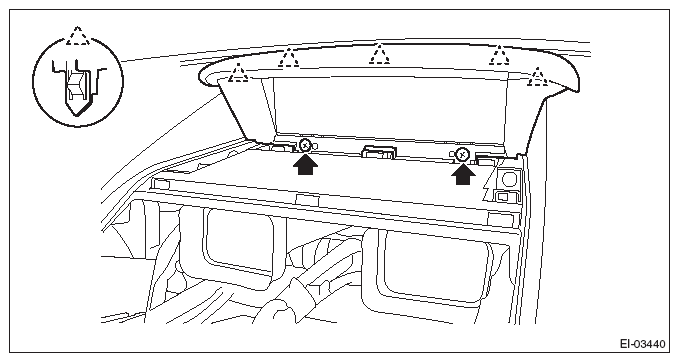 Courtesy of SUBARU OF AMERICA, INC.
- Remove the screws and then remove the multi-function display.
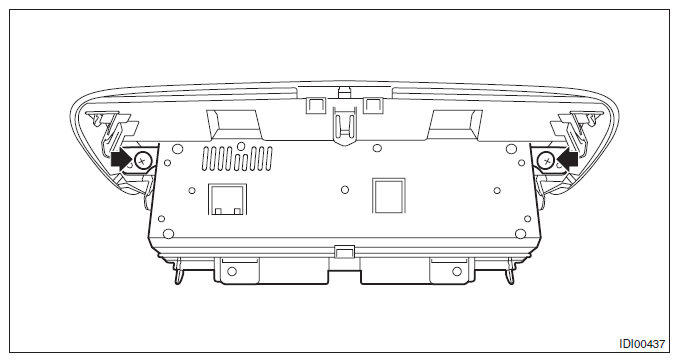 Courtesy of SUBARU OF AMERICA, INC.