October 30: LEMON manuals on a temporary server, it is slow and having issues, download the manuals you need! Later in November we will switch back to the fast server.
Check Each Connection
- Turn the ignition switch to ACC.
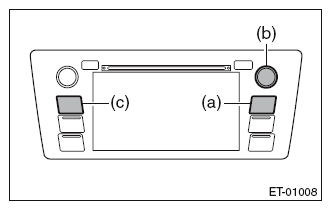
- Press the button (b) twice with the button (a) pressed.
 Courtesy of SUBARU OF AMERICA, INC.
NOTE:
Pressing the button (c) for 3 seconds or more, or turning the ignition switch from the OFF to ACC position can exit the diagnostic mode.
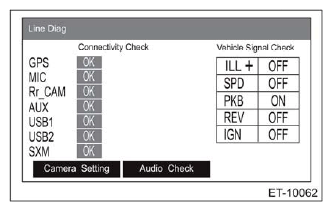
- {Line Diag} screen is displayed.
- Check the connection status with the {Connectivity Check} in the {Line Diag} screen.
 Courtesy of SUBARU OF AMERICA, INC.
NOTE:
GPS is displayed only for the navigation system.
OK: Each connection device is connected properly.
NG: No connection or abnormal connection is detected.
NOTE:
Check the external connection terminals (USB 1, 2 and AUX) by connecting a memory for check or a pin jack.
- Check the connection status of the connector. If there are no problems, the connection device or unit could be faulty.