September 30: LEMON manuals is back up on a temporary server! Slowness is possible
Main Body ECM: Removal
- Precautions
- Always carry out work support when replacing the main body ECM (Network gateway computer). (Refer to WORK SUPPORT
)
- After turning the ignition switch to OFF, you may have to wait for a while before disconnecting the battery terminals. Check appropriate precautions for battery terminal disconnection before proceeding.
- Disconnection of the battery ground terminal (Refer to WORKING PRECAUTIONS AND NOTES
)
- Remove the instrument side panel LH (Refer to DISASSEMBLY
)
- Remove the instrument panel under cover sub-assembly No. 1. (Refer to LIGHT CONTROL RHEOSTAT
)
- Removal of the instrument panel junction block assembly
- Disconnect the two connectors from the power steering computer assembly.
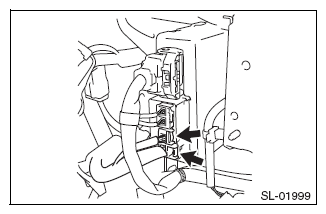 Courtesy of SUBARU OF AMERICA, INC.
- Disconnect the six connectors on the front of the instrument panel junction block assembly.
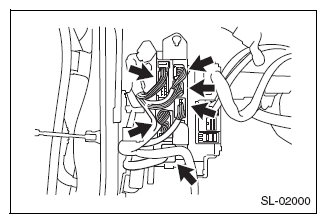 Courtesy of SUBARU OF AMERICA, INC.
- Undo the bolt and nut and detach the instrument panel junction block assembly.
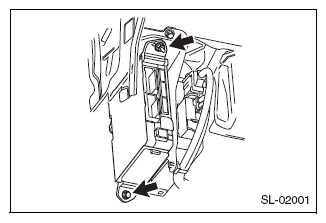 Courtesy of SUBARU OF AMERICA, INC.
- As shown in the diagram, unhook the tabs and disconnect the instrument panel junction block assembly rear connector.
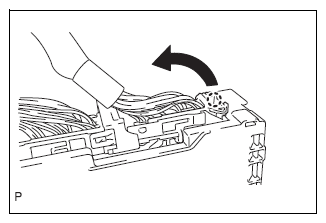 Courtesy of SUBARU OF AMERICA, INC.
- As shown in the diagram, unhook the tabs and release the connector lock.
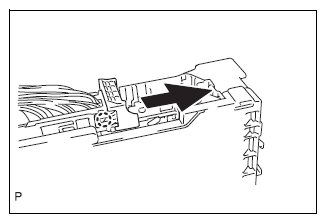 Courtesy of SUBARU OF AMERICA, INC.
- As shown in the diagram, unhook the tabs and detach the connector.
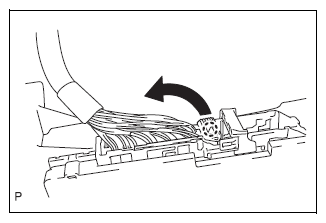 Courtesy of SUBARU OF AMERICA, INC.
- Remove the instrument panel junction block assembly.
- Removal of the main body ECM (Network gateway computer)
- Press the instrument panel junction block assembly tab to release the main body ECM (Network gateway computer) lock.
- Once the lock is released, insert a flat tip screwdriver horizontally that has been wrapped in protective tape between the main body ECM (Network gateway computer) and the instrument panel junction block assembly.
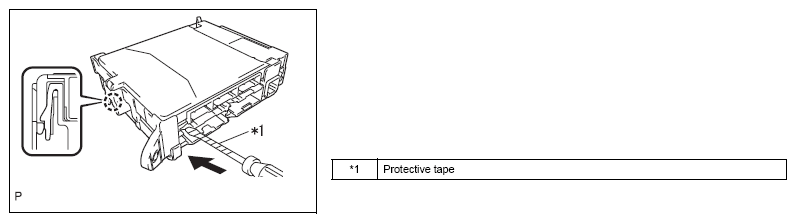 Courtesy of SUBARU OF AMERICA, INC.
CAUTION:
Please use a flat tip screwdriver with a shaft diameter between 5.0 mm {0.197 in} and 6.3 mm {0.248 in}, and a length of 90mm {3.543 in} or more.
- As shown in the diagram, use the inserted flat tip screwdriver to lift up the main body ECM (Network gateway computer) until it is in a position where the connector can be moved.
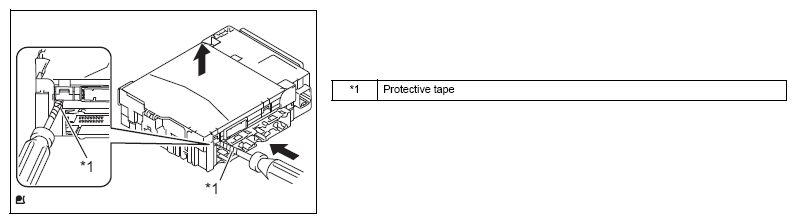 Courtesy of SUBARU OF AMERICA, INC.
CAUTION:
Do not use the flat tip screwdriver to lift it up with a prying action.
- Lift up the main body ECM (Network gateway computer) in the direction of arrow (1) in the diagram and slide it out in the direction of arrow (2).
CAUTION:
Do not touch the ECM connector.
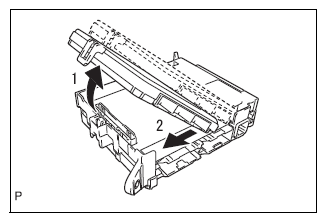 Courtesy of SUBARU OF AMERICA, INC.