October 30: LEMON manuals on a temporary server, it is slow and having issues, download the manuals you need! Later in November we will switch back to the fast server.
How To Use The SUBARU Select Monitor
- Prepare the Subaru Select Monitor kit. Refer to
PREPARATION TOOL , General Description.
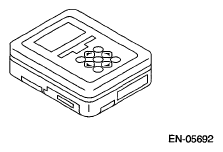 Courtesy of SUBARU OF AMERICA, INC.
- Prepare PC with Subaru Select Monitor installed.
- Connect the USB cable to SDI (Subaru Diagnosis Interface) and USB port on the personal computer (dedicated port for the Subaru Select Monitor).
NOTE:
The dedicated port for the Subaru Select Monitor means the USB port which was used to install the Subaru Select Monitor.
- Connect the diagnosis cable to SDI.
- Connect SDI to data link connector located in the lower portion of the instrument panel (on the driver's side).
CAUTION:
Do not connect any scan tools except Subaru Select Monitor or generic scan tool.
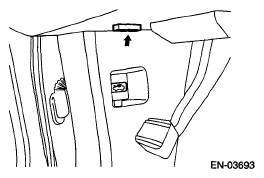 Courtesy of SUBARU OF AMERICA, INC.
- Start the PC.
- Turn the ignition switch to ON (engine OFF) and run the "PC application for Subaru Select Monitor".
- Call up DTC and data, then record them.
NOTE:
For detailed operation procedures, refer to " Subaru Select Monitor".