October 30: LEMON manuals on a temporary server, it is slow and having issues, download the manuals you need! Later in November we will switch back to the fast server.
System Operation Check Mode: Operation: Notes
- Prepare the Subaru Select Monitor kit. <Ref. to
PREPARATION TOOL , General Description.>
- Connect the diagnosis cable to the Subaru Select Monitor.
- Connect the Subaru Select Monitor to the data link connector at the lower portion of instrument panel (on the driver's side).
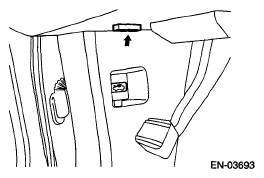 Courtesy of SUBARU OF AMERICA, INC.
CAUTION:
Do not connect anything other than the Subaru Select Monitor and general scan tool.
- Turn the ignition switch to ON (engine OFF) and run the Subaru Select Monitor.
- On the «Main Menu» display screen, select the {Each System Check}.
- On the «System Selection Menu» display screen, select the {Engine Control System}.
- Select the [OK] after the information of engine type has been displayed.
- On the «Engine Diagnosis» display screen, select the {System Operation Check Mode}.
- The following items will be displayed on screen.
FUEL PUMP CONTROL CHART
| Display |
| Fuel Pump Control |
| Idling Ignition Timing Fixed |
| Idle Speed Control |
| Injector Control |