September 30: LEMON manuals is back up on a temporary server! Slowness is possible
Switching to Connected Vehicle Maintenance Mode
- Switch the ignition ON (engine off or on).
- After verifying that the Mazda Connect home screen launched, press the following buttons simultaneously for 3 s or more while pressing the volume knob on the commander switch.
- FAVORITES button
- AUDIO button
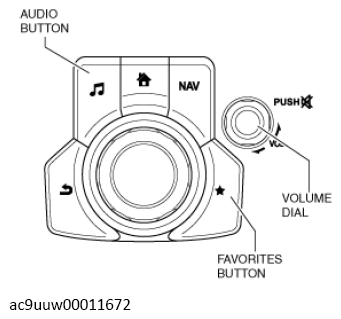 Courtesy of MAZDA MOTORS CORP. Courtesy of MAZDA MOTORS CORP.
|
- Select [Service Information] on the [Factory/Service Inspection] screen.
- Select [Communication Restricted Mode] on the [Service Information] screen.
- Put a check in the checkbox for [Communication Restricted Mode ON] on the [Communication Restricted Mode] screen.
- Select [Switch to the Communication Restricted Mode]. Verify that the display on the center display switched to the [Embedded Communications Restricted] screen.