October 30: LEMON manuals on a temporary server, it is slow and having issues, download the manuals you need! Later in November we will switch back to the fast server.
Fan, Cooling: Installation: 3.2L
 Courtesy of CHRYSLER GROUP, LLC Courtesy of CHRYSLER GROUP, LLC
|
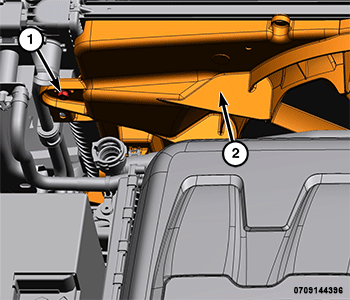
- Install the cooling fan (2) and tighten the left bolt (1) to the proper torque specification. Refer to (TECHNICAL SPECIFICATIONS
).
 Courtesy of CHRYSLER GROUP, LLC Courtesy of CHRYSLER GROUP, LLC
|
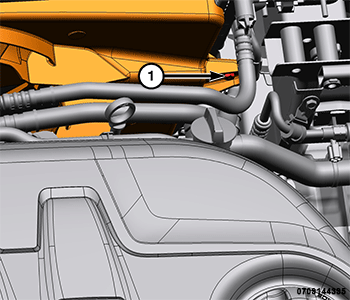
- Install the right cooling fan bolt (1) and tighten to the proper torque specification. Refer to (TECHNICAL SPECIFICATIONS
).
 Courtesy of CHRYSLER GROUP, LLC Courtesy of CHRYSLER GROUP, LLC
|
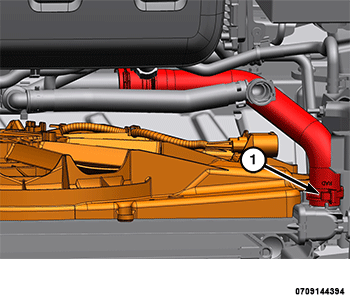
- Install the upper radiator hose (1).
 Courtesy of CHRYSLER GROUP, LLC Courtesy of CHRYSLER GROUP, LLC
|
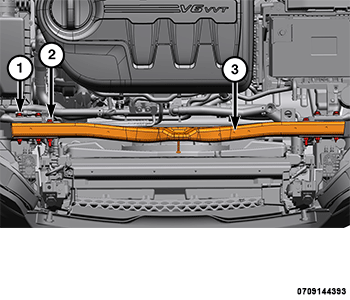
- Install the upper core support (3) and tighten the bolts (1, 2) to the proper torque specification. Refer to (TECHNICAL SPECIFICATIONS
).
 Courtesy of CHRYSLER GROUP, LLC Courtesy of CHRYSLER GROUP, LLC
|
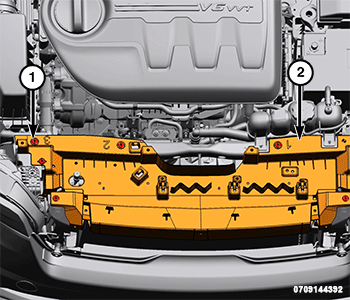
- Install the upper radiator panel (2) and securely tighten the screws (1).
 Courtesy of CHRYSLER GROUP, LLC Courtesy of CHRYSLER GROUP, LLC
|
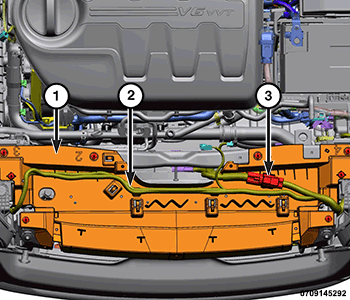
- Install the wire harness (2) to the upper radiator panel (1) and connect the cooling fan wiring harness connector (3).
 Courtesy of CHRYSLER GROUP, LLC Courtesy of CHRYSLER GROUP, LLC
|
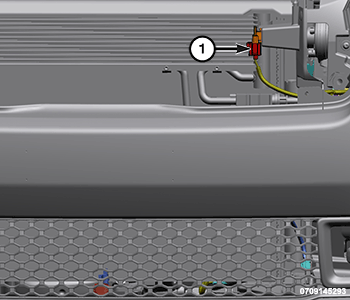
- Connect the ambient temperature sensor wire harness connector (1).
- Install the hood latch and cables. Refer to LATCH, HOOD, INSTALLATION
.
- Install the pressurized coolant bottle. Refer to BOTTLE, PRESSURIZED COOLANT, INSTALLATION .
- Connect the negative battery cable. If equipped with an Intelligent Battery Sensor (IBS), connect the IBS connector to the negative battery cable.