Navigation System: Service and Repair
Removal
NOTE:
- Take care not to scratch the crash pad and related parts.
1. Disconnect the negative (-) battery terminal.
2. Remove the glove box housing.
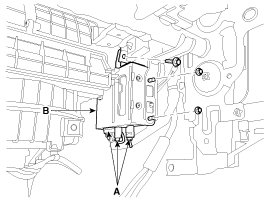
3. Disconnect the connectors (A) and loosen the bolt (1EA) and the nuts (2EA), then remove the Telematics unit (B).
Installation
1. Install the Telematics unit.
2. Install the glove box housing.
3. Connect the negative (-) battery terminal.
Inspection
1. After replacing the AVN, connect to "call center" by pushing the Blue Link button.
2. If Blue Link service connected successfully, and then technician can hear the "Welcome to Hyundai Bluelink" sound.
NOTE:
After replacing the AVN, the TMU automatically read the Vehicle Identity Number (VIN) and send it to Blue Link service center.
In this reason, technician have to test that Blue Link connect normally.