September 30: LEMON manuals is back up on a temporary server! Slowness is possible
Transmitter Code Registration
- Connect the DLC cable of hi-scan to the data link connector (16 pins) in driver side crash pad lower panel, turn the power on hi-scan.
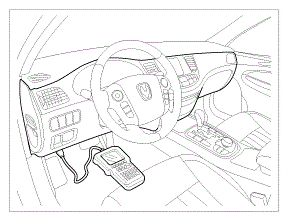 Courtesy of HYUNDAI MOTOR AMERICA
- Select the vehicle model and then do "CODE SAVING"
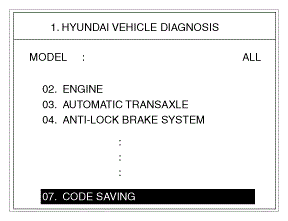 Courtesy of HYUNDAI MOTOR AMERICA
- After selecting "CODE SAVING" menu, push "ENTER" key, then the screen will be shown as below in illustration.
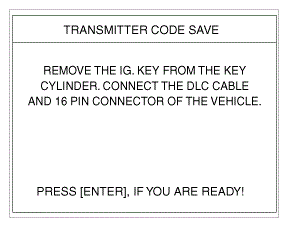 Courtesy of HYUNDAI MOTOR AMERICA
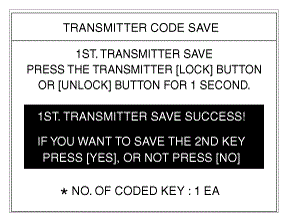
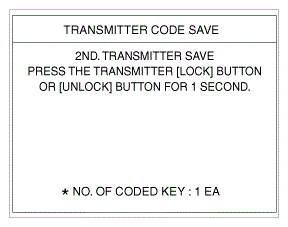
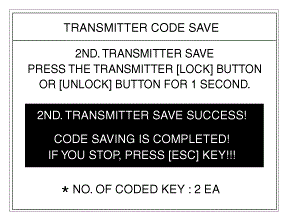
- After removing the ignition key from key cylinder, push "ENTER" key to proceed to the next mode for code saving. Follow steps 1 to 4 and then code saving is completed.
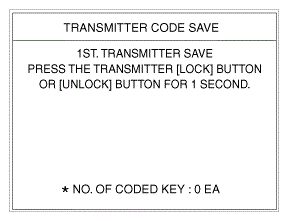 Courtesy of HYUNDAI MOTOR AMERICA
 Courtesy of HYUNDAI MOTOR AMERICA
 Courtesy of HYUNDAI MOTOR AMERICA
 Courtesy of HYUNDAI MOTOR AMERICA