Entertainment Systems: Service and Repair
Removal
AVN Head Unit
NOTE:
- Take care not to scratch the center fascia panel and related parts.
- Eject all the disc before removing the AVN head unit to prevent damaging the CD player's load mechanism.
1. Disconnect the negative (-) battery terminal.
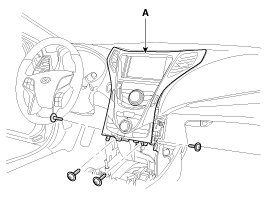
2. Remove the crash pad center fascia panel (A).
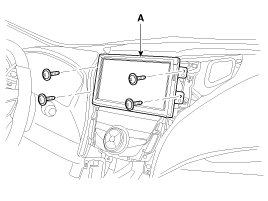
3. Remove the monitor (A) after loosening the mounting screws.
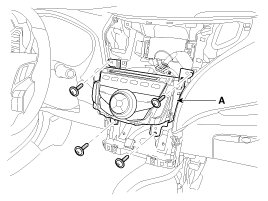
4. Remove the AVN head unit (A) after loosening the mounting screws.
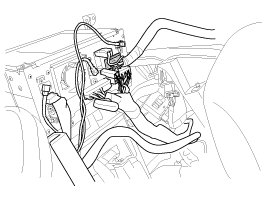
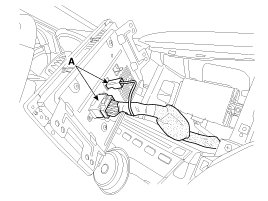
5. Remove the AVN head unit connectors and cables.
NOTE:
- If CD does not eject, don't try to remove it.
- The CD player may get damaged.
- Contact the nearest Hyundai Dealer for assistance.
AVN monitor
1. Remove the center fascia panel.
2. Remove the monitor (A) after loosening the mounting screws.
3. Remove the AVN monitor connectors and cables (A).
Installation
AVN Head Unit
1. Connect the AVN head unit connectors and cable.
2. Install the AVN head unit.
3. Install the center fascia panel.
4. Connect the battery (-) terminal.
NOTE:
Make sure the AVN Head unit connectors are plugged in properly and the antenna cable is connected properly.
AVN monitor
1. Install the AVN monitor.
2. Install the center fascia panel.