Functional Variations
Central Locking System Functional Variations
The various functions listed in the table can be called up by selecting channel numbers 03...10 and adapted.
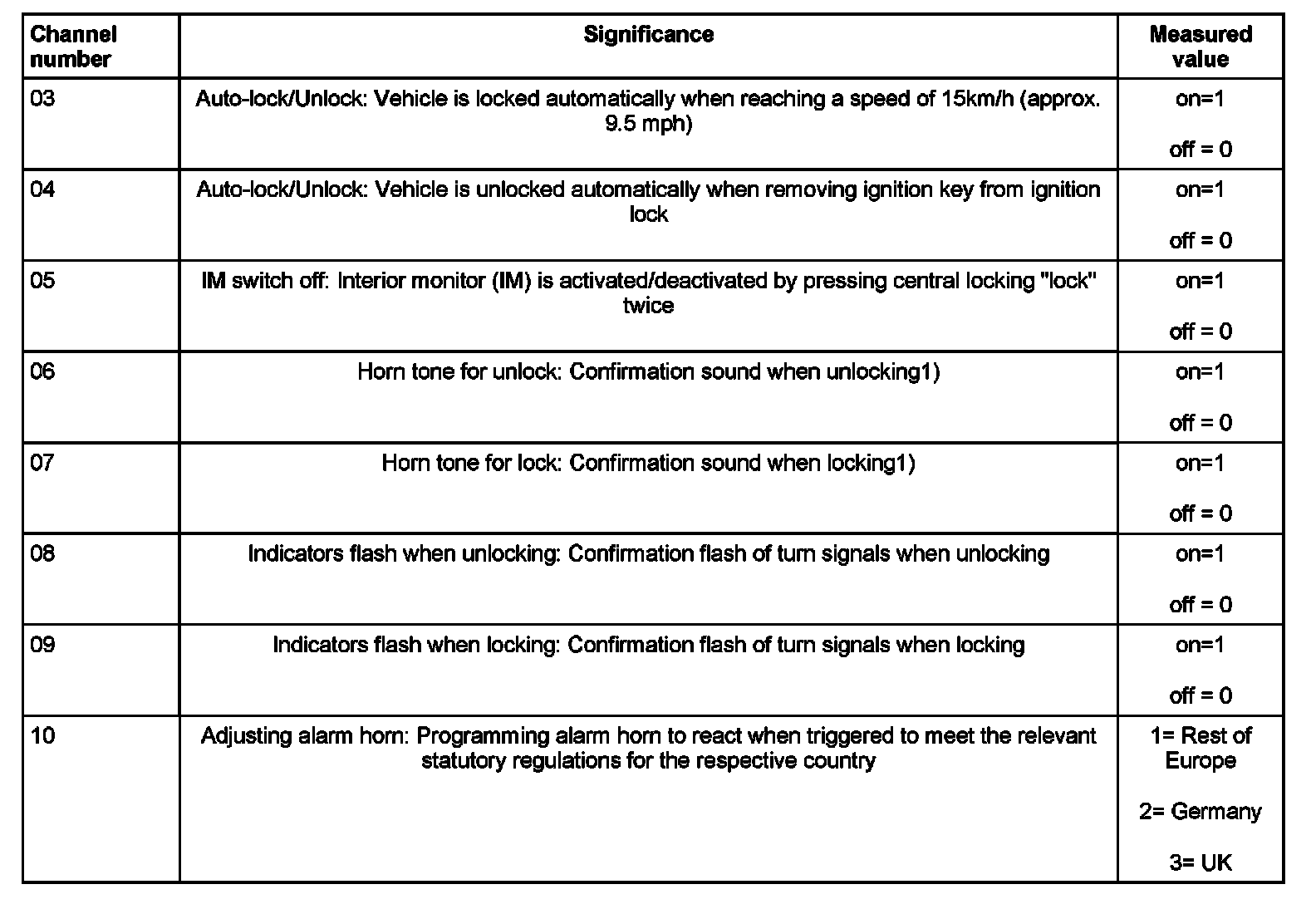
1) No longer permitted in Germany according to current statutory regulations.
The adaptation shown here is only an example.
Indicated on display:
Rapid data transfer HELP
Select function XX
- Press buttons -1- and -0- (10 selects the "Adaptation" function).
Indicated on display:
Rapid data transfer Q
10 - Adaptation
- Confirm entry with -Q- button.
Indicated on display:
Adaptation
Enter channel number XX
- Press buttons -0- and -6- (channel number 06 switches the horn on or off when locking).
Indicated on display:
Adaptation Q
Enter channel number 06
- Confirm entry with -Q- button.
Indicated on display:
Channel 6 Adaptation 0 ->
Unlock Beep 0 <-1 3->
- Press -> button.
Indicated on display:
Channel 6.....Adaptation 0 ->
Enter adaptation value XXXXX
- Press -> button.
- Press the -0- button four times and then the -1- button (e.g. 00001).
Indicated on display:
Channel 6.....Adaptation 0 Q
Enter adaptation value 00001
- Confirm entry with -Q- button.
Indicated on display:
Channel 6 Adaptation 1 ->
Unlock Beep 1 <-1 3->
- Confirm entry with -Q- button.
Indicated on display:
Channel 6 Adaptation 1 Q
Save amended value?
- Confirm entry with -Q- button.
Indicated on display:
Channel 6 Adaptation 1 ->
Amended value is saved
- Press -> button.
Indicated on display:
Rapid data transfer HELP
Select function XX
- Press buttons -0- and -6- to end the output.
Indicated on display:
Rapid data transfer Q
06 End output
- Confirm entry with -Q- button.
Indicated on display:
Rapid data transfer HELP
Enter address word XX
- Switch off ignition.
- Disconnect connection to scan tool V.A.G 1551.